Are you an MCC student and having technical problems?
Help is available from MCC student technical support. You can find answers to common questions about MCC online systems including:
If you still have questions, please call MCC student technical support at 816.604.1000, option 1.
Student technical support hours
| Monday | Tuesday | Wednesday | Thursday | Friday |
|---|---|---|---|---|
| 8:00 a.m. - 4:30 p.m. | 8:00 a.m. - 6:00 p.m. | 8:00 a.m. - 6:00 p.m. | 8:00 a.m. - 4:30 p.m. | 8:00 a.m. - 4:30 p.m. |
Are you an MCC employee having technical problems? Help is available from MCC employee IT support by submitting an IT Ticket or call employee IT support at 816.604.1888.
Password reset/first time login
Students
Steps to set up your Microsoft password if you’re a new student, or are an existing student that has forgotten their password or have locked their account from too many failed login attempts
You will need your MCC student username, which will look something like S########@student.mcckc.edu. This should have been provided to you when you completed enrollment. If you do not have it, contact the info center student tech support at 816.604.1000, option 1
Below are the steps to reset your self-service password watch the video below.
- Go to myMCCKC.
- Select “Forgot My Password” OR “…can’t sign in” to self-unlock your account after too many attempts.
- Complete the reCAPTCHA on the next page.
- Choose how you prefer verification (by phone or personal email) and choose test.
- Enter the verification code that you received.
- Create a new password and select “Finish”
- Log back into myMCCKC to use your new password.
New or existing employees
Steps to set up your Microsoft password if you are a new or existing employee or have forgotten their password or have locked your account from too many failed login attempts.
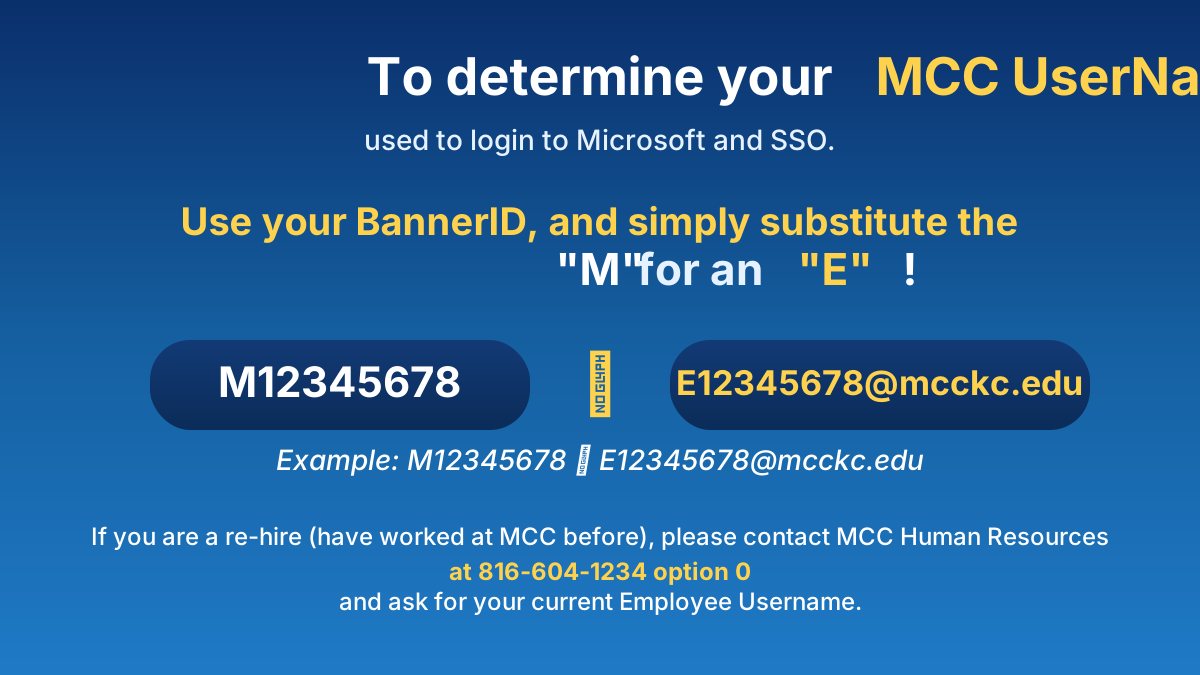
- You will need your MCC username:
- For existing employees (hired before 8/9/2025), your username will be first.last@mcckc.edu.
- If hired after 8/9/2025, your username will follow a format of E#######@mcckc.edu (there may be exceptions if you are a re-hire and your employee record was migrated to Banner from PeopleSoft, in which case it will follow the first.last@mcckc.edu format).
- If you are a new employee, your MCC Username should have been provided by MCC HR in a welcome e-mail to the
personal e-mail address you provided during the hiring process.
- Follow the steps in the video below.
Self-Service Password Reset (SSPR) process